DESKTOP APP • WINDOWS • MAC • LINUX

Stop Downloading YouTube Videos
One at a Time.

BatchTube processes entire playlists, channels, and bulk URL lists — with transcripts, MP3 extraction, and AI summaries built in. Runs locally. No cloud. No data leaks.

Download BatchTube Free → See Features

Free forever • No account required • Start in 60 seconds

500+
Videos per batch
6
Output formats
3
Platforms supported
0
Cloud dependencies
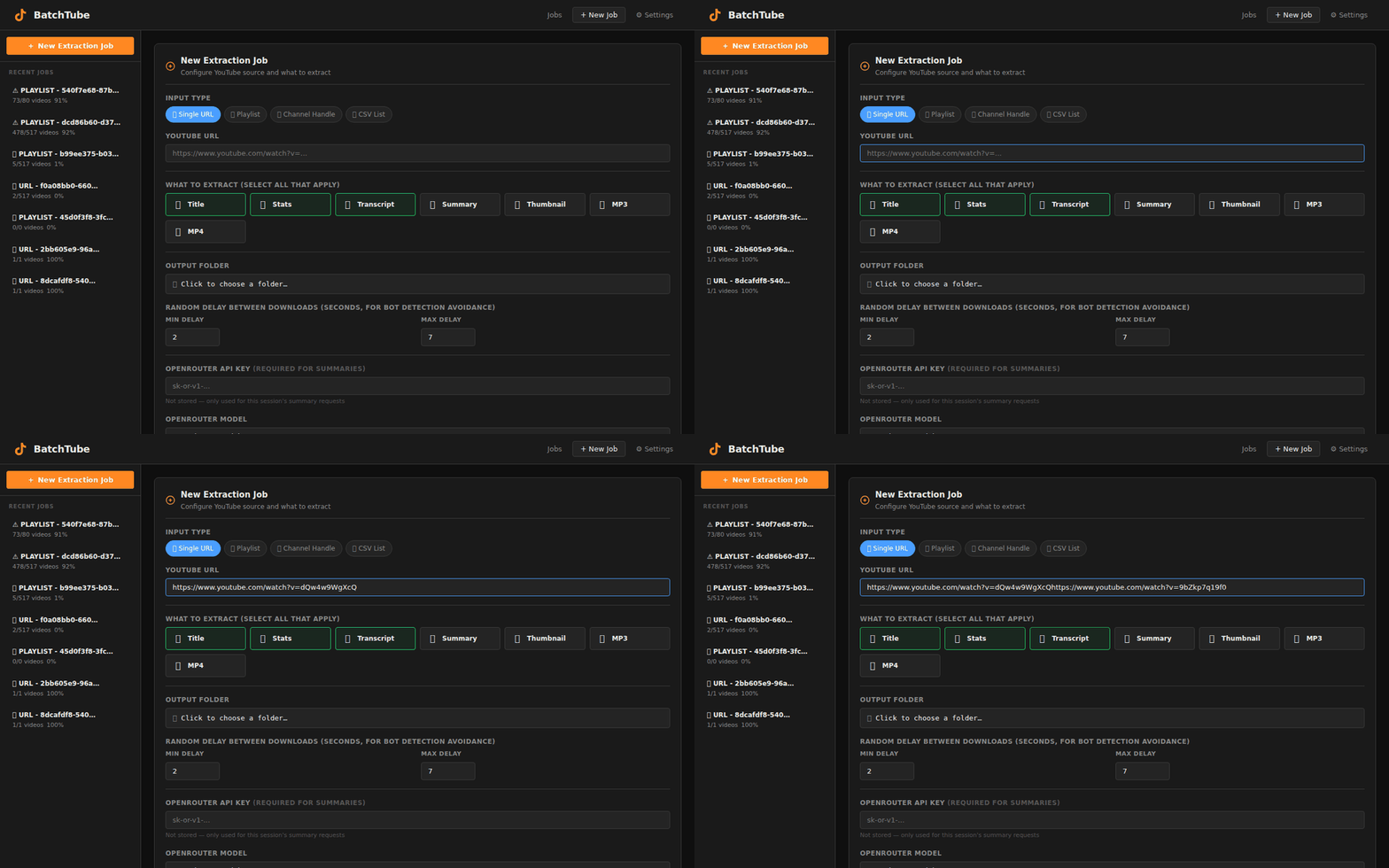
BatchTube — localhost:8000
BatchTube app walkthrough — batch download, queue management, settings

Everything your YouTube workflow needs.

Six tools in one. All running locally on your machine.

Batch Processing
Paste a playlist URL, a channel URL, or a CSV of hundreds of links. BatchTube queues and processes everything in one run — no babysitting required.
📝
Transcript Extraction
Powered by local AI speech recognition running on your machine. Timestamped, accurate, exportable. Every word from every video, ready to repurpose.
🧠
AI Summaries
Get the key points from any video without watching a second of footage. AI summaries extract topics, takeaways, and action items automatically.
📊
Metadata Export
Export structured JSON and CSV — titles, descriptions, view counts, upload dates, channel data. Plug directly into your research or analytics workflow.
📷
Real-Time Progress
Live WebSocket dashboard shows every download as it happens. Queue status, completion rates, error logs — full visibility into your batch at all times.
🔗
MCP Integration
BatchTube ships with a built-in MCP server. Connect it directly to Claude, Cursor, or any AI assistant that supports the Model Context Protocol.

Running in 60 seconds.

No cloud account. No API keys. No configuration headaches.

1
Download & Run
Download BatchTube and double-click start.bat (Windows) or run the shell script. Your browser opens automatically.
2
Paste Your URLs
Paste a YouTube playlist, channel URL, or upload a CSV of hundreds of video links. BatchTube handles the rest.
3
Choose Your Output
Select video quality, enable transcript extraction, AI summaries, MP3 audio, or metadata export. Mix and match.
4
Watch It Run
The live dashboard tracks every download in real time. Walk away. Come back to a completed batch — files on your hard drive, yours to keep.

The full workflow. 60 seconds.

Real app. Real interface. No demo smoke and mirrors.
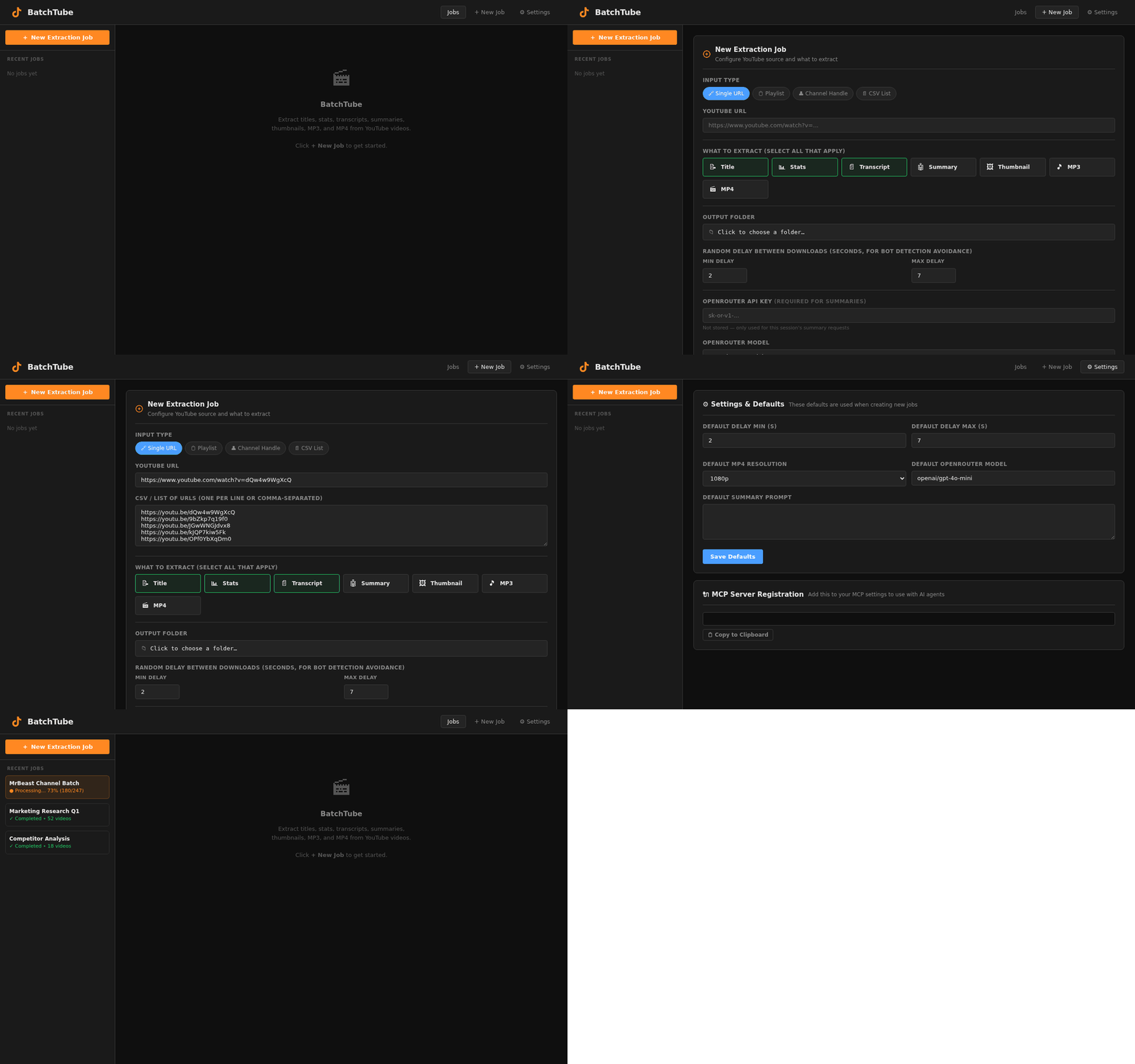
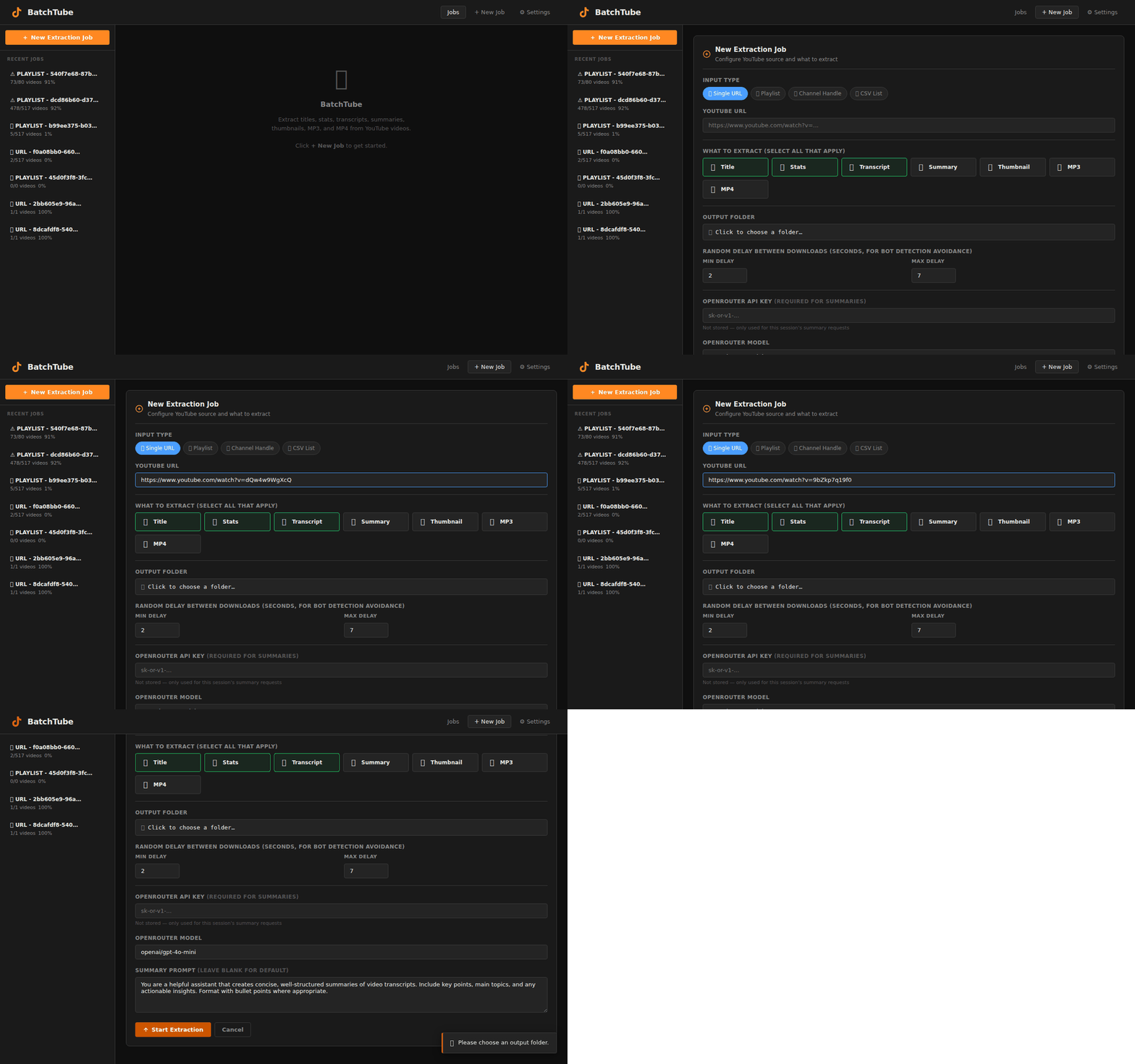
BatchTube — localhost:8000
BatchTube full feature walkthrough
Create a new extraction job
⚡ New Extraction Job
Single URL, playlist, channel handle, or CSV list. Configure what to extract in seconds.
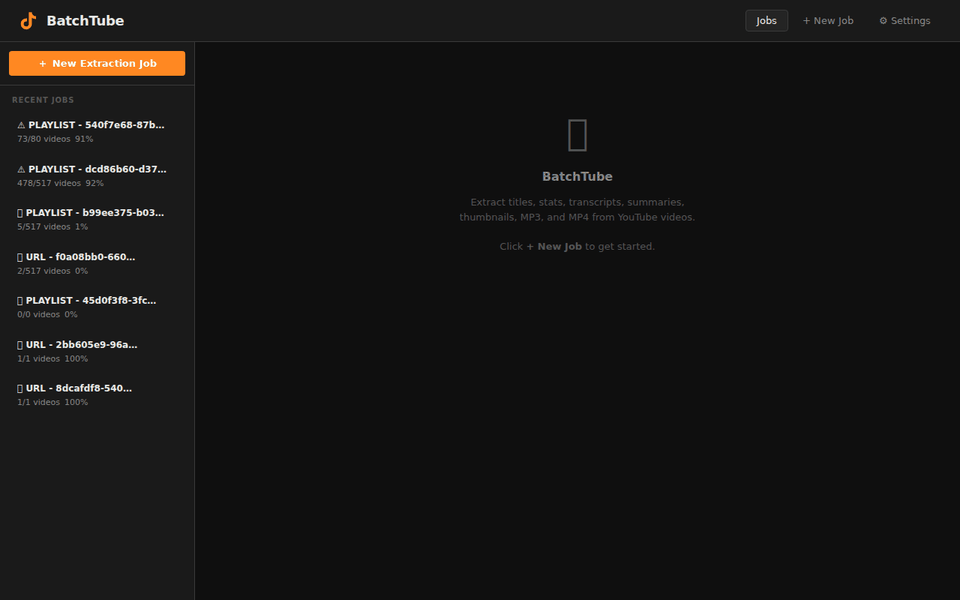
Track batch processing progress
📊 Live Progress Tracking
Real-time job dashboard. See every batch as it processes — status, progress, completion history.
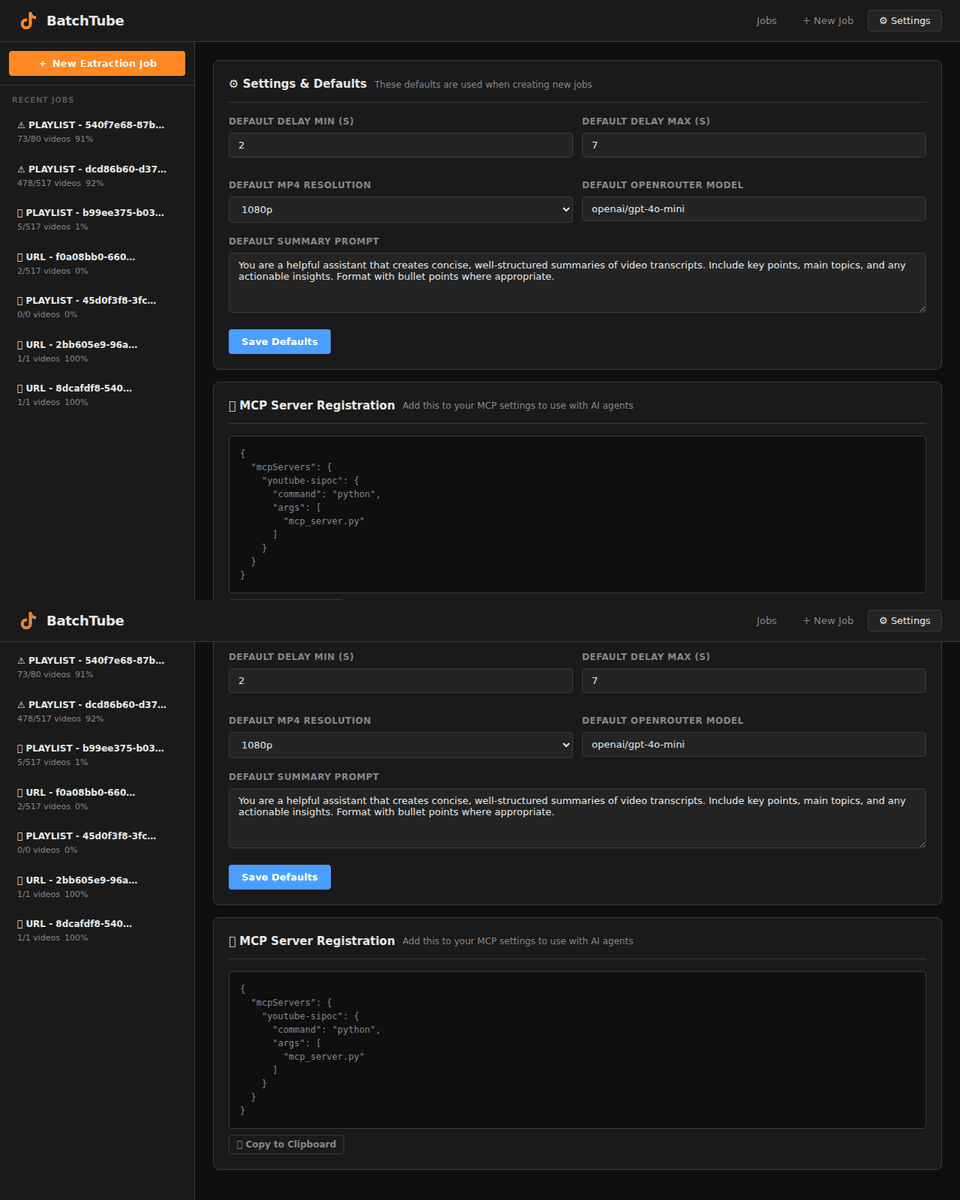
MCP server integration and settings
🔗 MCP Server Built In
Connect BatchTube directly to Claude, Cursor, or any AI assistant. One config line. Done.

Stop doing this manually.

Every hour you spend downloading videos one at a time is an hour you are not creating, researching, or building. BatchTube gives that time back.

Get BatchTube Free →

Built for people who work at scale.

Content creators, researchers, educators — anyone who works with YouTube seriously.

★★★★★

“I research competitor channels for clients every week. BatchTube cut my research time from 6 hours to 45 minutes. I paste the channel URL, walk away, and come back to a full transcript library. Nothing else does this.”

M
Marcus T.
YouTube Strategy Consultant
★★★★★

“I teach a media studies course and needed to archive 200+ videos for my curriculum before they disappeared. BatchTube downloaded everything overnight — transcripts included. My students now have a searchable library. Incredible tool.”

D
Dr. Diane K.
University Media Studies Professor
★★★★★

“The MCP integration is what sold me. I connected BatchTube directly to Claude and now I can ask questions about any YouTube channel's content without watching a single video. This is the future of research.”

R
Ryan S.
AI-Assisted Content Creator

Start free. Scale when you're ready.

Every plan runs locally on your machine. Your data never leaves your hard drive.

Monthly
Yearly Save 2 months
Free
$0
Try it. No account required.
  • 3 videos per batch
  • 720p max resolution
  • MP3 extraction
  • Transcripts
  • Batch CSV upload
  • AI summaries
  • Priority support
Download Free — Start Today
Pro
$39/mo
Or $390/yr — save 2 months
Unlimited power. Zero limits.
  • Unlimited downloads
  • 4K max resolution
  • MP3 extraction
  • Transcripts
  • Batch CSV upload
  • AI summaries
  • Priority support
Go Pro — $39/mo →
🔥 Best Value
Lifetime
$397 once
Pay once. Own it forever.
🔥 FOUNDING MEMBER PRICE — First 100 licenses onlyAfter 100 licenses: price goes to $597. Forever.
  • Unlimited downloads
  • 4K max resolution
  • MP3 extraction
  • Transcripts
  • Batch CSV upload
  • AI summaries
  • Lifetime updates
⚡ Lock in $397 before it's gone →

🛡 14-Day Money-Back Guarantee on all paid plans • No questions asked

Questions answered.

Is downloading YouTube videos legal?
Downloading YouTube videos for personal use, research, education, and archival purposes is widely practiced and legally protected in many jurisdictions under fair use doctrine. BatchTube is used by researchers, educators, journalists, and content archivists worldwide. We do not scrape YouTube's platform or violate rate limits. Use BatchTube responsibly, within the bounds of your intended purpose.
Does BatchTube work on Mac and Linux?
Yes. BatchTube runs on Windows, macOS, and Linux. The application runs a local server that opens in your browser — the same interface works identically across all three platforms. Windows users get a one-click start.bat launcher. Mac and Linux users run a shell script.
Does BatchTube violate YouTube's Terms of Service?
BatchTube is powered by a robust open-source engine maintained by a global developer community. YouTube’s ToS restricts commercial redistribution of downloaded content — not personal use or research. BatchTube does not redistribute content. It downloads to your local machine for your own use. Consult your own legal counsel if you have specific compliance questions.
Does BatchTube require an internet connection?
BatchTube needs an internet connection to download content from YouTube — that is the nature of the task. But the application itself runs entirely locally on your machine. Your downloaded files, transcripts, and AI summaries are stored on your hard drive. No cloud account required. No data sent to our servers. Your content stays yours.
How accurate are the transcripts and AI summaries?
Transcripts are generated by AI speech recognition running locally on your machine. Accuracy is typically 95%+ for clear English audio. AI summaries extract key points, topics, and takeaways from the transcript automatically. Both outputs are editable and exportable.
What happens if YouTube changes something and BatchTube breaks?
BatchTube’s download engine is powered by a robust open-source engine maintained by a global developer community that pushes updates within hours of any YouTube change. Creator and Pro subscribers receive automatic updates. Lifetime customers receive every update forever. Your workflow stays uninterrupted.

Your competitors are already automating their research.

Are you still downloading one video at a time?

Download BatchTube Now — Free to Start →

No account required • Windows, Mac & Linux • 14-day guarantee on paid plans